Key Takeaways
- Internal links distribute PageRank between pages — how you link internally directly affects which pages rank
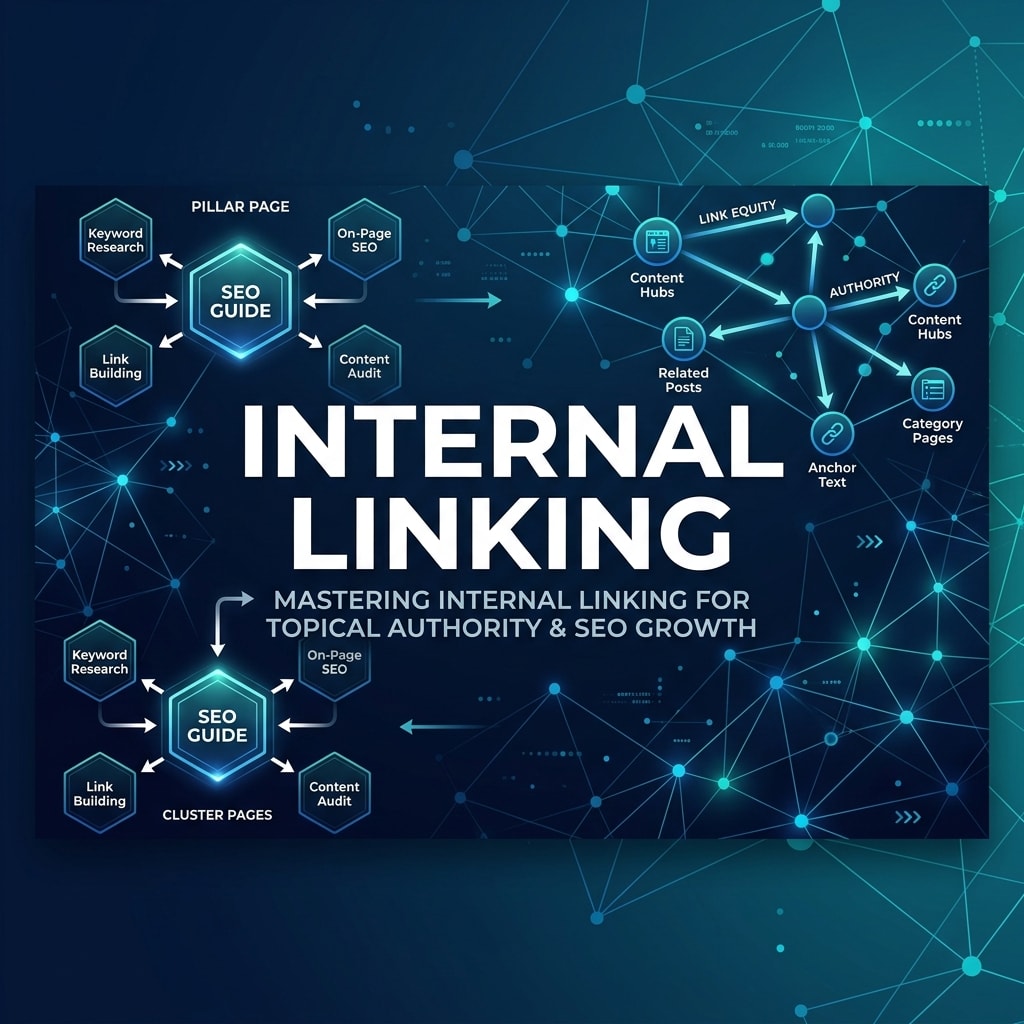
- The 4-layer model (Pillar → Cluster → Supporting → Conversion) gives every page a defined role in the link architecture
- Orphan pages (pages with no internal links pointing to them) are nearly impossible to rank regardless of content quality
- Anchor text in internal links sends semantic signals to Google about what the destination page covers
- Audit your internal link structure with the SEO Structure Analyzer to find gaps and orphan pages
What Is Internal Linking and Why Does It Directly Affect Rankings?
Internal linking is the practice of creating hyperlinks between pages within the same website. Unlike external backlinks (links from other sites), internal links are entirely within your control — making them one of the most powerful and underutilized ranking levers available to any website owner.
Internal links affect rankings through three documented mechanisms:
- PageRank distribution: Google's original ranking algorithm was built on the concept of link equity (PageRank) flowing between pages through links. Internal links pass a fraction of a page's authority to pages it links to. Pages with more internal links pointing to them receive more authority and rank more easily.
- Crawl priority signaling: Googlebot follows links to discover and recrawl pages. Pages with many internal links pointing to them get crawled more frequently — meaning new content and updates are indexed faster.
- Semantic relationship signaling: The anchor text and surrounding context of an internal link tells Google what the destination page is about. Descriptive internal link anchor text reinforces the topical relevance of the destination page for its target keywords.
The 4-Layer Internal Linking Architecture
Effective internal linking is not random — it follows a deliberate architecture that mirrors how you want Google to understand your site's topical structure.
Layer 1: Pillar Pages
Pillar pages are comprehensive, broad guides on your core topic areas. They cover a subject at the highest level and link out to all relevant cluster pages. Every major topic cluster on your site should have one pillar page that serves as the definitive hub.
Example: "The Complete Guide to SEO" — links to articles on keyword research, technical SEO, link building, on-page optimization, and content strategy.
Layer 2: Cluster Pages
Cluster pages go deep on specific sub-topics within a pillar. They link back to the pillar and to other related cluster pages within the same topic area. Cluster pages are the workhorses of topical authority — they demonstrate the breadth and depth of your coverage.
Example: "How to Do Keyword Research" — links back to the SEO pillar and to "Keyword Intent Analysis" and "Long-Tail Keyword Strategy."
Layer 3: Supporting Pages
Tool pages, calculators, resource pages, and glossary entries that support specific cluster topics. These receive links from cluster pages and link back into the cluster where appropriate.
Example: The Keyword Density Checker tool supports the "On-Page SEO" cluster and receives internal links from on-page SEO articles.
Layer 4: Conversion Pages
Service pages, landing pages, and contact pages that convert traffic to leads or customers. These receive links from pillar and cluster pages but generally link out minimally — their job is to convert, not distribute equity.
The Anatomy of an Effective Internal Link
Every internal link has four components that affect its SEO value:
| Component | What It Does | Best Practice |
|---|---|---|
| Anchor text | Tells Google what the destination page covers | Descriptive, keyword-rich — not "click here" |
| Surrounding context | Reinforces the semantic relevance of the link | Link from paragraphs that discuss the destination's topic |
| Destination page | The page receiving authority | Only link to pages that genuinely add value for the reader |
| Position on page | Links higher on the page pass more equity | Prioritize links in the body content over sidebars/footers |
Finding and Fixing Orphan Pages
An orphan page is a page that has no internal links pointing to it. It can only be found by search engines if it's in the sitemap — it cannot receive any PageRank from your other pages. Orphan pages are nearly impossible to rank competitively, regardless of content quality.
Common causes of orphan pages:
- Pages created but never linked from existing content
- Blog posts published without anyone updating older articles to link to them
- Tool pages with no educational blog content linking to them
- Old content that was replaced by newer articles without updating redirects or internal links
To find orphan pages: use the SEO Structure Analyzer to map your site's internal link graph and identify pages with zero inbound internal links. Alternatively, compare your sitemap URLs against a full link crawl — any URL in the sitemap but not in the link crawl is an orphan.
Anchor Text Strategy: The Semantic Signal
Anchor text is one of the most misunderstood internal linking signals. Many sites link with generic anchor text ("click here," "read more," "this article") — wasting the semantic signal that descriptive anchor text would send.
Avoid:
- "Click here to learn about keyword research"
- "Read this post for more information"
- "Our tool can help you"
Use instead:
- "Use the Keyword Density Checker to audit your content"
- "The On-Page SEO Checker identifies these issues automatically"
- "Our guide to keyword density in 2026 covers this in detail"
The anchor text "Keyword Density Checker" tells Google that the destination page is about keyword density checkers. "Click here" tells Google nothing.
How Many Internal Links Per Page?
Google has removed the hard cap on links per page (originally advised as 100), but practical guidelines still apply:
- Pillar pages: 10–20+ internal links out — they should link to every cluster page in their topic area
- Cluster pages: 5–10 internal links out — back to pillar, to related clusters, to supporting tools
- Blog posts (1,500–2,500 words): 4–8 internal links — enough to connect the topic cluster without feeling forced
- Tool pages: 3–6 internal links — to educational content that provides context for using the tool
Every internal link should be editorially justified. Link because it genuinely helps the reader — not to hit a link count target.
The Internal Linking Audit Process
- Crawl your site and generate a complete internal link map (source URL → destination URL → anchor text)
- Identify orphan pages — pages with 0 inbound internal links
- Identify over-linked pages — pages linked from nearly every other page (often the homepage) that drain equity from more important targets
- Map existing links to the 4-layer architecture — do pillar pages link to cluster pages? Do cluster pages link back to pillars?
- Review anchor text distribution — flag generic anchors ("click here," "here," "read more") for replacement
- Prioritize fixes — start with orphan pages for high-value content, then fix anchor text, then build new links for thin cluster coverage
Internal Linking Mistakes That Kill Rankings
- Linking only from the homepage: The homepage is not a substitute for content-level linking. Homepage links have low topical specificity.
- Over-linking to commercial pages: Product and service pages should receive internal links from relevant content — not from every page on the site, which dilutes the signal.
- Ignoring new content: Every new article published should update 3–5 existing articles to add links to the new one. This prevents new content from being orphaned.
- Using the same anchor text everywhere: Exact-match anchor text used identically across all internal links looks manipulative. Use natural variations.
- Linking in navigational elements only: Header and footer links have much lower PageRank weight than body content links. Navigation links don't substitute for editorial in-content links.
Key Takeaways
- Internal links distribute PageRank between pages, signal crawl priority, and communicate semantic relationships to Google
- The 4-layer architecture (Pillar → Cluster → Supporting → Conversion) gives every page a defined role in your link structure
- Orphan pages — those with no internal links pointing to them — cannot rank regardless of content quality
- Descriptive anchor text sends semantic signals about the destination page's topic — never use "click here"
- Every new piece of content should trigger updates to 3–5 existing articles to add links to the new page
- Audit your site's internal link architecture with the SEO Structure Analyzer
How does internal linking help SEO?
Internal linking helps SEO through three mechanisms: (1) PageRank distribution — linking to a page passes a fraction of the linking page's authority, helping the destination rank more easily. (2) Crawl priority — pages with more internal links are crawled more frequently, meaning updates are indexed faster. (3) Semantic signaling — the anchor text and surrounding content of internal links tells Google what the destination page covers, reinforcing topical relevance for target keywords.
What is an orphan page in SEO?
An orphan page is a webpage that has no internal links pointing to it from any other page on the same website. Orphan pages can only be found by search engines through the XML sitemap — they receive no PageRank from other pages. They are extremely difficult to rank competitively regardless of content quality because they exist in isolation from the site's topical authority structure. Find orphan pages by crawling your site and comparing discovered URLs against all internal link destinations.
What anchor text should I use for internal links?
Use descriptive, topic-relevant anchor text that accurately describes what the destination page covers. Instead of "click here" or "read more," use the actual topic: "keyword density checker," "on-page SEO guide," or "risk-reward calculator." This tells Google what the destination page is about and reinforces its topical relevance. Use natural variations of anchor text rather than the exact same phrase every time to avoid over-optimization signals.
How many internal links should a blog post have?
A typical blog post of 1,500–2,500 words should have 4–8 editorial internal links — enough to connect the content to its topic cluster without feeling forced. Pillar pages can have significantly more (10–20+) because they serve as the hub linking to all cluster pages. Every internal link should be editorially justified — link because it genuinely helps the reader access related information, not to hit an arbitrary count.
What is the difference between internal and external links for SEO?
External links (backlinks) come from other websites and are largely outside your direct control. They signal to Google that external sources consider your content valuable and authoritative. Internal links come from pages within your own website and are fully within your control. While external links are often considered more powerful for raw authority building, internal links are more strategically manageable and allow you to direct PageRank precisely to the pages you want to rank most.