Key Takeaways
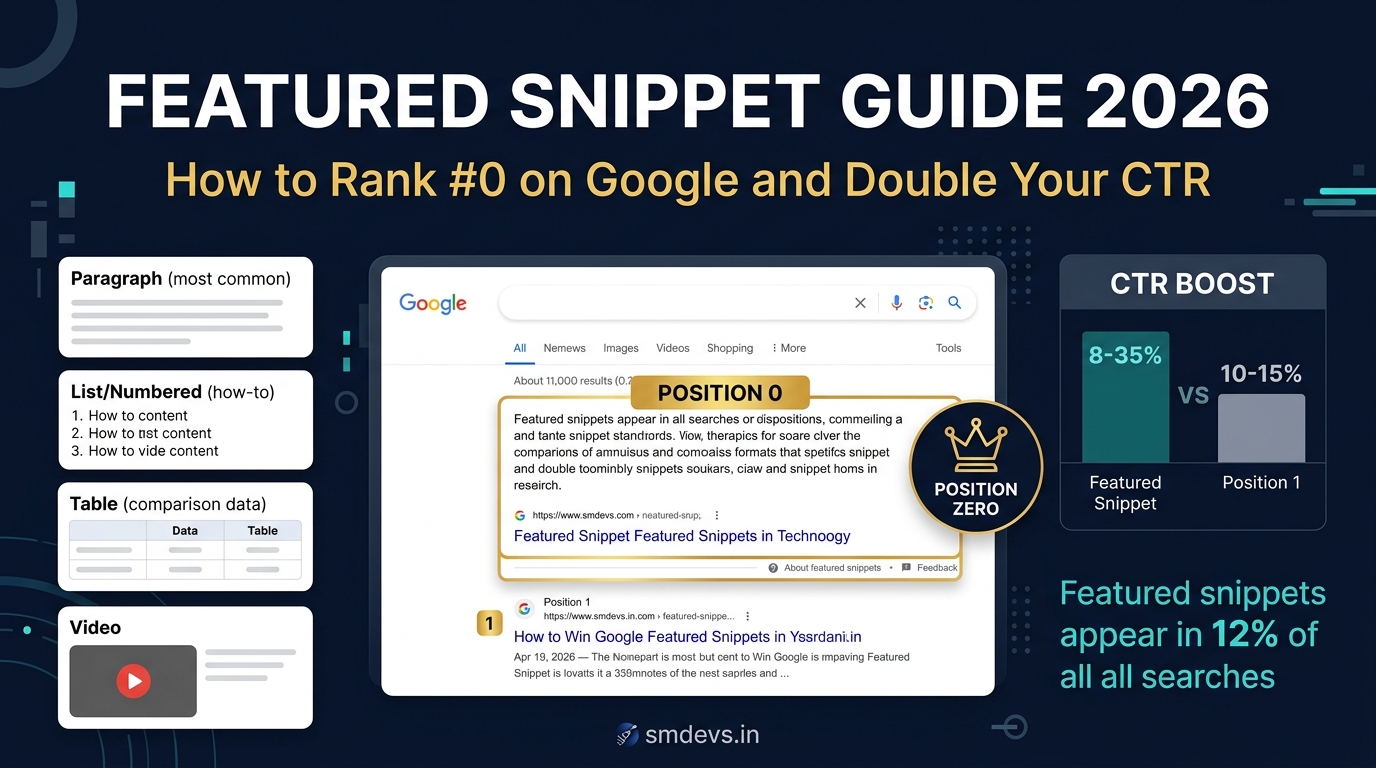
- Featured snippets — the highlighted boxes that appear at Position Zero above all organic results in Google — can generate 3–5x more clicks than a regular #1 position for certain query types. In 2026,
What is a Featured Snippet?
A featured snippet is a special search result box that Google displays at the very top of the search results page — above position 1 organic results — to directly answer a user's query. It typically shows an extract from a webpage that best answers the query, along with the page title and URL.
Featured snippets are also called Position Zero because they appear before the traditional #1 result. They are triggered for informational queries — typically questions or "how to" searches — where Google determines that a direct answer is more useful than a list of results.
Why featured snippets matter in 2026:
- Featured snippets can generate CTR of 8–35% compared to typical 10–15% for position 1
- They appear above the fold on desktop and are often the only result visible without scrolling on mobile
- Being featured signals to users that Google considers your page the authoritative answer — building brand trust
- Featured snippets are increasingly used to populate Google AI Overviews — pages already in snippets have better AI citation probability
4 Types of Featured Snippets
1. Paragraph Snippets (Most Common — 82% of all snippets)
A 40–60 word paragraph that directly answers a question. Google pulls this from a page where the answer is clearly and concisely stated.
Triggered by: Definition queries ("What is X?"), "how does X work?", "why does X happen?" questions.
Format that wins: Write a clear, direct, 40–60 word answer immediately after your H2 question heading. Don't bury the answer in the middle of a paragraph.
2. List Snippets (Steps and Bullets)
An ordered or unordered list pulled from a page. Either a numbered list (for how-to steps) or bullet points (for feature/attribute lists).
Triggered by: "How to X", "Steps to X", "Best ways to X", "Types of X" queries.
Format that wins: Use proper HTML ordered lists (<ol>) for sequential steps, unordered lists (<ul>) for non-sequential items. Keep each list item concise — Google often truncates items after 8 entries.
3. Table Snippets
A data table pulled from a page — ideal for comparison data, pricing information, or structured data sets.
Triggered by: "X vs Y comparison", pricing queries, "best X with Y features" queries that benefit from tabular data.
Format that wins: Use proper HTML table elements (<table>, <th>, <td>). Include clear column headers. Keep tables focused — Google typically shows 3–5 rows.
4. Video Snippets
A YouTube video featured at position zero — often for "how to" queries where visual demonstration is most helpful.
Triggered by: Visual how-to queries ("how to set up a demat account", "how to read candlestick charts").
For text-based content sites: Focus on paragraph, list, and table snippets. Video snippets require YouTube content.
8 Proven Tactics to Win Featured Snippets
Tactic 1: Target Question-Based Keywords
Featured snippets predominantly appear for question queries. Instead of targeting "RSI indicator," also create content targeting "what is RSI indicator?" and "how to use RSI indicator?" — question-form keywords have a much higher featured snippet trigger rate.
Use Google's People Also Ask (PAA) box, AnswerThePublic, and Semrush's Question filter to find question-based keywords your audience is asking.
Tactic 2: Format Your Answer for Snippet Extraction
Google pulls featured snippet content using its NLP algorithms, but it prefers content that follows a predictable structure:
- H2 heading that matches or paraphrases the query ("What is Search Intent?" as a heading)
- Immediately followed by a direct 40–60 word answer (no preamble, no "In this section we will discuss...")
- Followed by detailed explanation for users who want to go deeper
The "inverted pyramid" structure — answer first, detail second — is the format Google's snippet algorithm prefers.
Tactic 3: Use Proper HTML Structure
For list snippets: Use <ol> for numbered steps, <ul> for bullet points. Each list item should be a complete, standalone sentence — not just a word or phrase.
For table snippets: Use semantic HTML tables with <thead>, <tbody>, and <th> for column headers. Google can't extract table data from image-based tables or CSS-styled div tables.
Tactic 4: Aim for Pages Already Ranking Position 1–10
Google only shows featured snippets from pages it already has in its index and has some level of trust in. According to multiple studies, 99%+ of featured snippets come from pages that already appear on page 1 of organic results. Focus your snippet optimisation efforts on pages already ranking in positions 1–10.
In GSC → Performance → filter by position 1–10 — these are your snippet candidates. Optimise the formatting on these pages.
Tactic 5: Match Snippet Length Precisely
Paragraph snippets are typically 40–60 words. Write your direct answer to this length. Shorter answers may be overlooked; longer answers get truncated awkwardly.
List snippets typically show 6–8 items maximum. If your list has 12 items, Google may show only the first 6 with "More items..." — ensure the most critical items appear first.
Tactic 6: Add FAQ Schema Markup
FAQ schema markup (FAQPage schema) directly signals to Google which questions and answers exist on your page. While FAQ schema doesn't guarantee a featured snippet, it increases the probability that Google will extract a Q&A for a snippet. It also enables rich results (expandable FAQ dropdowns in the SERP).
Validate your FAQ schema with our free Schema Validator. Reference: JSON-LD Schema Examples guide.
Tactic 7: Update Existing High-Ranking Content
If you already rank #1 for a query but don't have the featured snippet, the issue is likely formatting. Revamp the section that should be the snippet: add the direct question as a heading, write a crisp 40–60 word answer immediately below, and restructure any relevant lists into proper HTML list elements.
Tactic 8: Monitor and Iterate with GSC
In Google Search Console → Performance, filter by query type to find queries where you're getting impressions but low CTR at position 1 — these are often queries where a competitor holds the featured snippet and is "stealing" clicks even though you rank higher. Winning the snippet from them requires better answer formatting.
Featured Snippets vs Google AI Overviews in 2026
Google AI Overviews have complicated the featured snippet landscape. When an AI Overview appears, it takes the top visual position — effectively making the featured snippet less prominent. However:
- AI Overviews frequently cite and link to featured snippet pages — your snippet = AI citation probability
- Not all queries trigger AI Overviews — featured snippets still dominate for many informational queries
- Featured snippets appear more often for precise, factual queries where an AI synthesis isn't warranted
The overlap between "featured snippet-worthy" and "AI citation-worthy" content is high — strong snippet formatting doubles as strong AI Overview citation formatting. One strategy, two rewards.
FAQs: Featured Snippets
What is a Google featured snippet?
A featured snippet (also called Position Zero) is a highlighted answer box that Google displays at the very top of search results to directly answer a user's question. It shows a paragraph, list, or table extracted from a webpage, along with the page title and URL. It appears above all paid ads and organic results for certain informational queries.
How do I get my content into a featured snippet?
Key steps: (1) Target question-based keywords ("what is X?", "how to X"), (2) Rank on page 1 for the query first, (3) Structure your answer with the question as an H2 heading immediately followed by a concise 40–60 word direct answer, (4) Use proper HTML lists and tables for list/table snippets, (5) Add FAQ schema markup to question-answer sections, (6) Monitor GSC for queries where you rank 1–10 without a snippet — these are your optimisation targets.
Do featured snippets increase CTR?
Yes — for most query types, winning the featured snippet significantly increases CTR over a regular position 1 result. Studies show featured snippets typically receive 8–35% CTR for certain query types. However, for "simple fact" queries where the snippet fully answers the question, CTR can be lower because users get their answer without clicking. For complex topics where the snippet sparks interest, CTR boost is substantial.


