Key Takeaways
- Meta title is the #1 on-page SEO element and your SERP headline
- Optimal meta title length is 50-60 characters including the primary keyword
- Meta description does not affect rankings but directly controls click-through rate
- Every page needs a unique meta title and description
- Use SM Developers Meta Tag Generator for free SERP preview before publishing
Your meta title and meta description are the first impression your website makes on potential visitors—before they ever see your content, your design, or your brand. They appear in Google search results as the clickable headline and the description below it. Together, they determine whether someone clicks on your result or the one above or below it.
Getting these right is not complicated. But most websites get them wrong in predictable, fixable ways. This guide shows you the exact formula for writing meta tags that maximize click-through rates, with real before/after examples and a free tool to generate and preview yours instantly.
Key Takeaways
- Your meta title is the most important on-page SEO element—it is both a keyword signal to Google and a clickable ad to users.
- Optimal meta title length is 50–60 characters. Shorter loses opportunity; longer gets cut off in SERPs.
- Meta description does not directly affect rankings, but it controls click-through rate—which indirectly influences rankings.
- Every page must have a unique meta title and description. Duplicate tags across multiple pages suppress all of them.
- Use the free Meta Tag Generator to write, preview, and copy tags for any page in seconds.
What Are Meta Tags and Why Do They Matter?
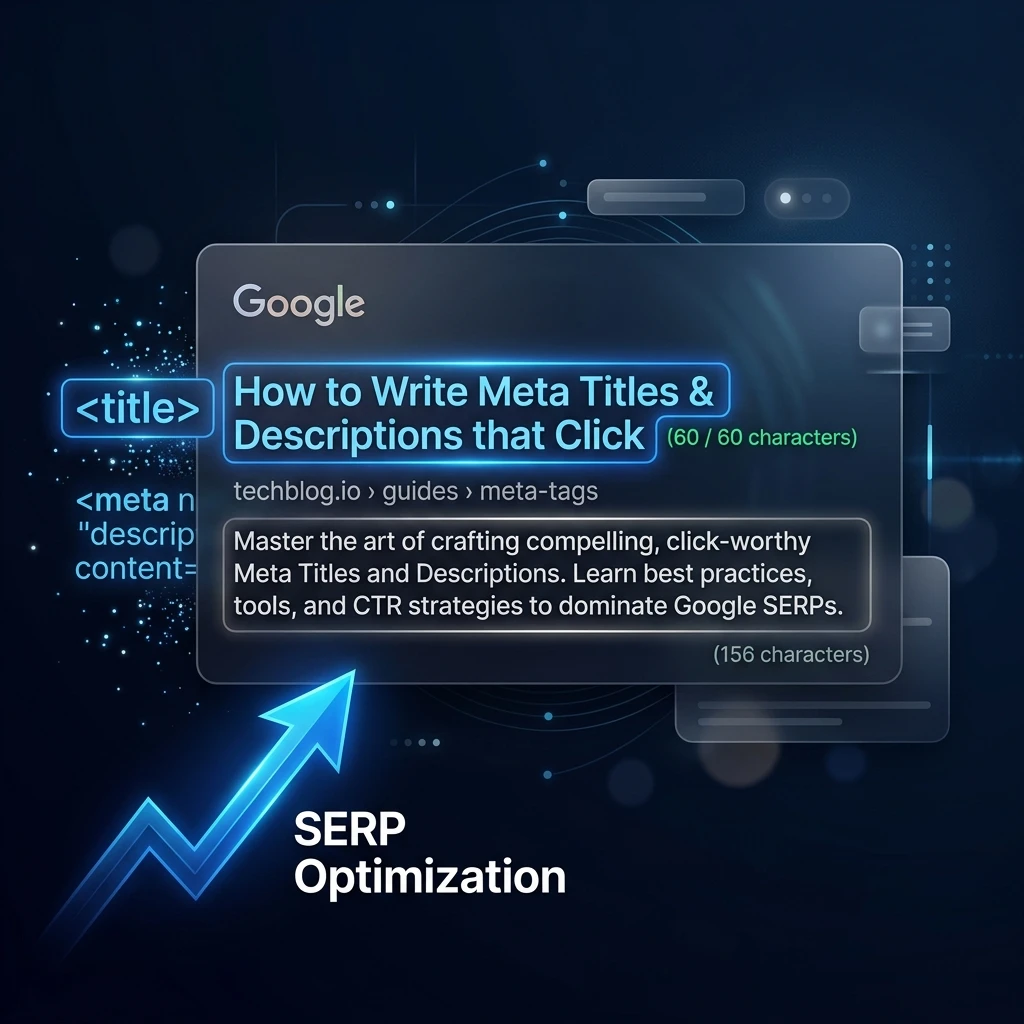
Meta tags are HTML elements in your page's <head> section that communicate information about your page to search engines and browsers. Two are critical for SEO:
- Meta Title (
<title>): The clickable blue headline in Google results. Also displayed in browser tabs and shared as the default link title on social media. - Meta Description (
<meta name="description">): The 1–2 sentence summary shown below the title in search results. Users read this to decide whether the result answers their question.
Here is the HTML structure:
<head>
  <title>How to Write Meta Tags — Complete Guide (2026)</title>
  <meta name="description" content="Learn to write meta titles and descriptions that maximize CTR. Includes real examples and a free generator tool." />
</head>
The Meta Title Formula: What Works and Why
A high-performing meta title does five things simultaneously:
- Contains the primary keyword (preferably in the first 55 characters)
- Communicates a specific benefit or promise—not just a description
- Differentiates from the other titles on the same SERP page
- Is 50–60 characters total (prevents truncation at the "..." cutoff)
- Ends with the brand name if character space allows
Real Before/After Examples
| Before (Generic) | After (Optimized) | What Changed |
|---|---|---|
| Schema Markup | SM Developers | Free Schema Validator — Fix Rich Snippet Errors Instantly | Added benefit, action word, specificity |
| Pivot Calculator | Pivot Point Calculator Free — Intraday Levels in Seconds | Added "Free," use case, speed promise |
| SEO Tools - SM Developers Platform | 18+ Free SEO Tools — No Signup, No Credit Card | SM Devs | Quantified, removed friction objection, branded |
| Blog - Resources | SEO Blog 2026 — Free Guides for Bloggers & Marketers | Year signal, specific audience, content type clarity |
Character Count Rules
- Under 50 characters: Too short — leaves keyword and benefit opportunity unused
- 50–60 characters: Optimal — full display in Google desktop and mobile results
- 61–70 characters: Risk of truncation on mobile (but sometimes acceptable)
- Over 70 characters: Will be truncated with "..." on most screens — avoid
The Meta Description Formula: Writing Your 160-Character Ad
Meta descriptions do not directly influence keyword rankings. Google's own documentation confirms this. What they do influence is click-through rate—the percentage of people who see your result and click on it. And higher CTR sends stronger engagement signals that do influence rankings indirectly.
Think of your meta description as a 160-character advertisement placed directly below your headline. It has one job: convince the user that your page is the best result for their specific query.
The High-Converting Description Structure
[Address the user's query directly] + [Specific benefit or differentiator] + [Soft call-to-action]Real Examples
Weak description: "SM Developers has free SEO tools that you can use to improve your website's SEO and rankings in search engines."
Strong description: "Validate schema, generate meta tags, analyze keywords, and audit on-page SEO — all free, no account needed. Start your audit in 60 seconds."
The strong version: addresses what users get specifically, differentiates with "no account needed" (removes friction), and includes a time-promise CTA.
The Seven Elements of a High-CTR Meta Description
- Contains the primary keyword (Google bolds matched terms, making your result stand out)
- Addresses the query directly — starts with what the user will find, not what you are
- Includes a specific differentiator — why this result over the others?
- Has a soft CTA — "Learn how," "Start free," "Discover," "Find out"
- Is 140–160 characters — shorter loses impact; longer is cut off
- Does not repeat the title — the title is already visible; use this space for additional information
- Uses active voice — "Improve your CTR by 30%" not "CTR improvements are possible"
Common Meta Tag Mistakes and How to Avoid Them
| Mistake | Impact | Fix |
|---|---|---|
| Duplicate meta titles across multiple pages | All affected pages suppressed in ranking | Every page needs a unique title |
| Missing meta description (left blank) | Google generates a random excerpt — usually low quality | Always write a custom description |
| Keyword stuffing in title | Truncated display + spam signal | One primary keyword, naturally integrated |
| Using the same description sitewide | Zero benefit, possible duplicate content signal | Unique description per page |
| Not updating after page content changes | Misleading description increases bounce rate | Review meta tags whenever content changes significantly |
Using the Meta Tag Generator: A Walkthrough
- Navigate to the Meta Tag Generator
- Enter your page title and primary keyword
- Write your description in the description field (the character counter updates in real time)
- Preview your result in the live SERP preview box — this shows exactly how your result will appear in Google on both desktop and mobile
- Adjust until the preview looks compelling and all character counts are in the green zone
- Copy the generated HTML and paste it into your page's
<head>section
The SERP preview is the most valuable part of this tool. It forces you to see your result from the user's perspective—which is the only perspective that matters for CTR optimization.
Open Graph Tags: Meta Tags for Social Media
When your page is shared on LinkedIn, X (Twitter), Facebook, or WhatsApp, a different set of tags controls the preview: Open Graph tags. Without them, social platforms generate their own preview—usually pulling random text and a broken or irrelevant image.
Use the Open Graph Generator to create the complete OG tag block alongside your meta tags. The key properties to set:
og:title— Can be identical to your meta title or a social-optimized variantog:description— Similar to meta description but optimized for social sharingog:image— A 1200×628px image that appears as the share card thumbnailog:url— The canonical URL of the page
Frequently Asked Questions
Should my meta title include my brand name?
Yes, if character space allows. Brand name at the end (separated by | or —) is the standard format. Example: "How to Write Meta Tags (2026) | SM Developers." This helps build brand recognition in SERPs even for users who don't click immediately.
Will Google always use my meta description?
No. Google rewrites meta descriptions approximately 62% of the time, based on its assessment of which text from your page better matches the specific query. You cannot prevent this, but writing an excellent description reduces the likelihood of a rewrite and ensures the rewritten version has quality source material.
Does including the year in the meta title help?
For evergreen and how-to content, yes—including the year signals freshness and increases CTR because users prefer the most current information. However, you must update the year annually or the title becomes a negative signal when it becomes dated.
How do I check if my current meta tags are optimized?
Run your page URL through the SEO Structure Analyzer. It will check your meta title and description lengths, flag duplicates, and identify missing tags across your most important pages.
Generate Your Meta Tags Now
Every minute your pages have suboptimal meta tags, you are leaving click-through rate—and traffic—on the table. Open the Meta Tag Generator, generate a new title and description for your most important page, and preview how it will look in Google before updating it.