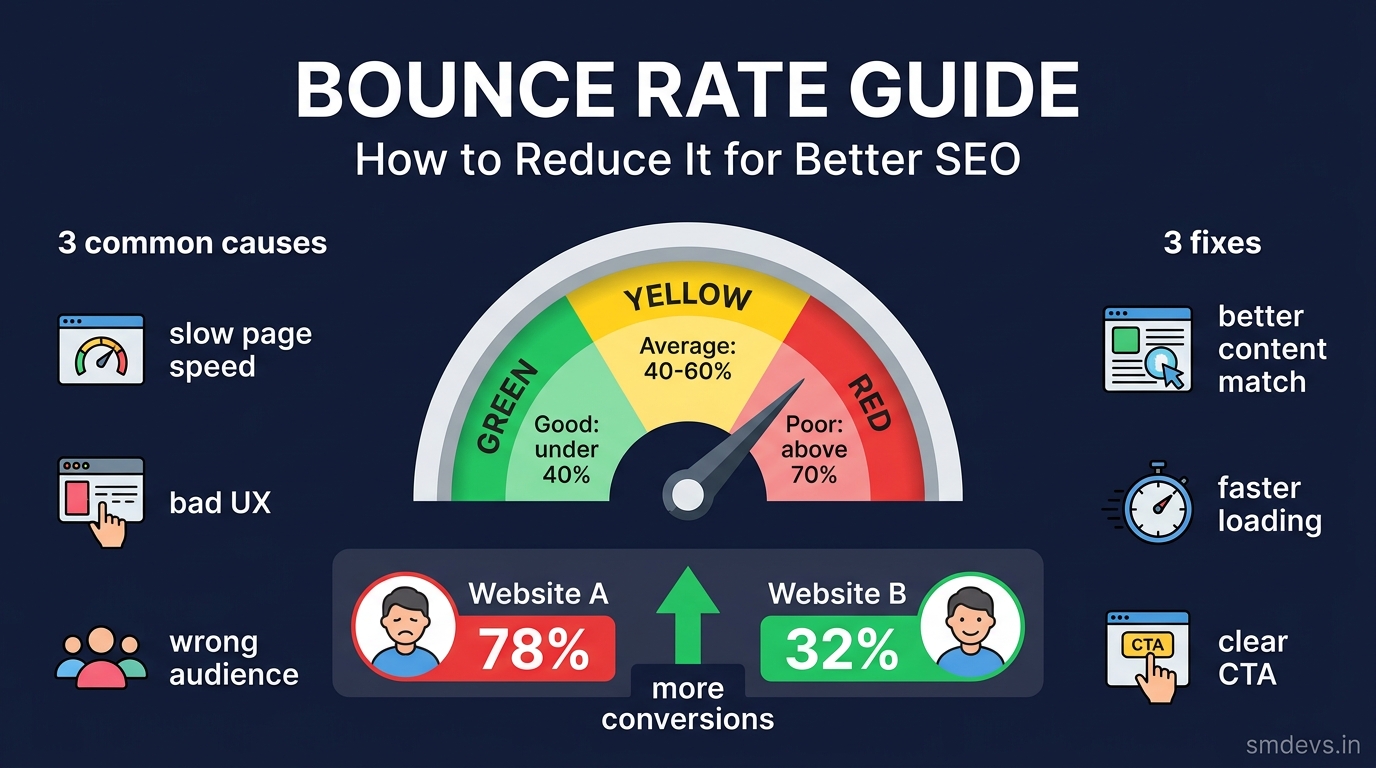
Key Takeaways
- Bounce rate is the percentage of visitors who land on your page and leave without clicking to any other page on your site. A high bounce rate signals to Google that your page may not be satisfying the
What is Bounce Rate?
Bounce rate is the percentage of single-page sessions on your website — visitors who land on a page and leave without interacting with any other page. In Google Analytics 4 (GA4), this is measured as the inverse of the engagement rate: a "bounced" session is one that lasts less than 10 seconds, has no conversion event, and has only one pageview.
Formula: Bounce Rate = (Single-Page Sessions ÷ Total Sessions) × 100
Example: If 1,000 people visit your blog post and 600 leave without clicking anything else, your bounce rate is 60%.
Is Bounce Rate a Google Ranking Factor?
This is the most debated question in SEO. Google has officially stated that bounce rate from Google Analytics is NOT a direct ranking signal — Google doesn't have access to your GA4 data.
However, Google does measure user behaviour through its own systems:
- Pogo-sticking: When a user clicks your search result, immediately returns to Google, and clicks a competitor's result — this IS a negative signal Google measures internally
- Dwell time: How long a user spends on your page before returning to search results — Google uses this as a quality signal
- Click-through rate (CTR): Low CTR combined with poor engagement reinforces that a page isn't satisfying search intent
Bottom line: Your GA4 bounce rate isn't directly read by Google, but the underlying reasons for a high bounce rate (poor content, slow load, mismatch with search intent) absolutely hurt your rankings.
What is a Good Bounce Rate?
| Bounce Rate | Assessment |
|---|---|
| Below 25% | Excellent — very high engagement (or possible tracking error) |
| 25–40% | Good — strong content-intent match |
| 40–55% | Average — acceptable for most content types |
| 55–70% | Needs improvement — investigate causes |
| Above 70% | Poor — significant content or UX problem |
Important context: Bounce rate benchmarks vary significantly by page type and industry:
| Page / Site Type | Expected Bounce Rate | Why |
|---|---|---|
| Blog posts / articles | 65–90% | Users read and leave — this is normal behaviour |
| E-commerce product pages | 20–45% | Users browse multiple products before buying |
| Landing pages | 60–90% | Single purpose pages — users convert or leave |
| Contact / About pages | 40–60% | Users find what they need and leave |
| Tool / calculator pages | 30–55% | Users use the tool, then explore more |
| News / media sites | 65–85% | Single article reads are normal |
Never compare your blog's bounce rate (70%) to an e-commerce site's (35%) — the context is completely different.
12 Proven Strategies to Reduce Bounce Rate
1. Match Content to Search Intent (Most Important)
The #1 cause of high bounce rate is a mismatch between what the user searched for and what your page delivers. If someone searches "pivot point calculator" and lands on a blog post about trading theory — they bounce instantly.
- Check what keyword is driving traffic to each high-bounce page in GSC
- Ensure your page's H1, introduction, and content directly addresses that keyword's intent
- If the page doesn't match intent, either rewrite it or create a better-matched page
2. Improve Page Load Speed
53% of mobile users abandon pages that take more than 3 seconds to load (Google data). Every extra second of load time increases bounce rate by approximately 32% (Unbounce).
- Test with PageSpeed Insights
- Compress and convert images to WebP format
- Target LCP (Largest Contentful Paint) under 2.5 seconds
3. Add Compelling Internal Links
Internal links keep visitors on your site. Every page should have 3–5 relevant internal links to related content:
- Use descriptive anchor text (not "click here")
- Link to genuinely related content — don't force links
- Add "Related Articles" sections at the end of blog posts
- Use contextual in-content links — they get clicked 3x more than sidebar links
4. Improve Your Introduction (Hook in First 100 Words)
Most bounces happen within the first 10 seconds — before users have even read a paragraph. Your introduction must immediately confirm the user is in the right place:
- State what the page covers in the first sentence
- Use the target keyword naturally in the first paragraph
- Promise a specific outcome: "By the end of this guide, you'll know exactly how to..."
- Avoid long introductions that delay getting to the value
5. Improve Readability
Walls of text cause instant bounces. Format content for scannability:
- Short paragraphs (2–3 sentences maximum)
- Use H2 and H3 subheadings every 200–300 words
- Use bullet points and numbered lists for steps and features
- Use bold text to highlight key information
- Include tables for comparisons and data
- Font size minimum 16px — 18px for body text is better for mobile
6. Make Your Site Mobile-Responsive
60%+ of Indian web traffic comes from mobile devices. A non-responsive site creates an immediate bounce:
- Test with Google's Mobile-Friendly Test
- Buttons must be minimum 44×44px (tap-friendly)
- No horizontal scrolling on mobile
- Text must be readable without zooming
7. Add a Clear Call-to-Action (CTA)
Tell visitors what to do next. A clear next step reduces exits:
- "Try our free Schema Validator tool →"
- "Read next: How to Add Schema Markup Step by Step →"
- "Download the PDF checklist →"
8. Use Engaging Media
Pages with images, infographics, embedded videos, and charts have lower bounce rates because they give users multiple reasons to stay:
- Add a relevant hero image or infographic above the fold
- Embed a relevant YouTube video for how-to content (users watch, increasing time-on-page)
- Use comparison tables to present data visually
9. Avoid Pop-Ups on Mobile
Aggressive pop-ups — especially those that appear immediately on page load on mobile — are a major bounce trigger. Google also penalises intrusive interstitials in its mobile ranking algorithm. If you use pop-ups, set them to trigger after 30 seconds or on exit intent only.
10. Open External Links in New Tab
If users click an external link that opens in the same tab, they leave your site — and that session counts as a bounce. Always use target="_blank" rel="noopener noreferrer" for external links.
11. Improve Site Search
If a user doesn't find what they need on the current page but can search your site, they stay. Add a visible search box and ensure it works well — especially on content-heavy sites.
12. Fix Pages with Unusually High Bounce Rates
In GA4, go to Reports → Engagement → Pages and Screens → sort by Bounce Rate descending. Identify your 10 highest-bounce pages and investigate each:
- Is the content thin or outdated?
- Is the page slow?
- Does the content match the keyword driving traffic to it?
- Is there a clear next step for the user?
How to Check Bounce Rate in GA4
In Google Analytics 4, bounce rate is not prominently displayed by default. Here's how to find it:
- Go to GA4 → Reports → Engagement → Pages and Screens
- Click Customise report (pencil icon, top right)
- Under Metrics, add Bounce Rate
- Save the report
- Sort by Bounce Rate descending to find your worst-performing pages
Note: GA4's Bounce Rate definition differs from Universal Analytics (UA). In GA4, a bounce is a session under 10 seconds with no events. In UA, it was any single-page session regardless of duration. GA4 bounce rates are typically lower than UA for the same pages.
FAQs: Bounce Rate
What is a good bounce rate for a blog?
For blogs and article pages, a bounce rate of 65–80% is normal and not cause for concern. Blog readers typically read one article and leave — that's expected behaviour. Focus on improving bounce rate for tool pages, landing pages, and e-commerce pages where multi-page browsing is part of the user journey.
Does high bounce rate hurt SEO?
Google Analytics bounce rate is not a direct Google ranking signal. However, the behaviour causing high bounce rates — poor content, slow pages, intent mismatch — indirectly hurts SEO. Google's internal signals (like pogo-sticking) do measure user satisfaction. If users consistently click back to search results after visiting your page, that is a negative quality signal for that page.
How is bounce rate different in GA4 vs Universal Analytics?
In Universal Analytics (UA), bounce rate = any session with only one pageview. In GA4, bounce rate = sessions lasting under 10 seconds with no engagement events (no clicks, no conversions, no second pageview). GA4 bounce rates are typically 10–20 percentage points lower than UA for the same pages because a user who reads your article for 5 minutes counts as "engaged" in GA4 but "bounced" in UA.


